
Plan Your Week with AI: 5 Simple Steps to Turn a Messy To-Do List into a Clear Schedule
When you plan your week with AI, the feeling that “everything is urgent” starts to fade. Instead of staring at a long, messy list in your notes app and not knowing where to begin, you can ask an AI assistant to sort, prioritize and slot your tasks into time blocks in about 20 minutes.
This guide walks through 5 simple steps to turn a pile of tasks into a clear weekly plan, with a sample prompt you can copy and a few tips so AI genuinely helps rather than adding to the chaos.
Contents: plan your week with AI
1. Why plan your week with AI?
Planning is tiring not because it is hard, but because you have to weigh so many things at once: deadlines, importance, how long things take, meetings and your own energy. AI assistants are good at that rough sorting: grouping similar tasks, suggesting an order and estimating time.
You still make the final decisions. AI simply gets you from “a heap of tasks” to “a draft plan” faster, so you can save your energy for the work that matters.
Who will find it most useful?
- People juggling several projects: who need to know what to tackle first.
- Working parents: balancing work and family schedules.
- Students with jobs: facing overlapping deadlines.
- Freelancers: with no one setting fixed hours for them.
2. 5 steps to plan your week with AI
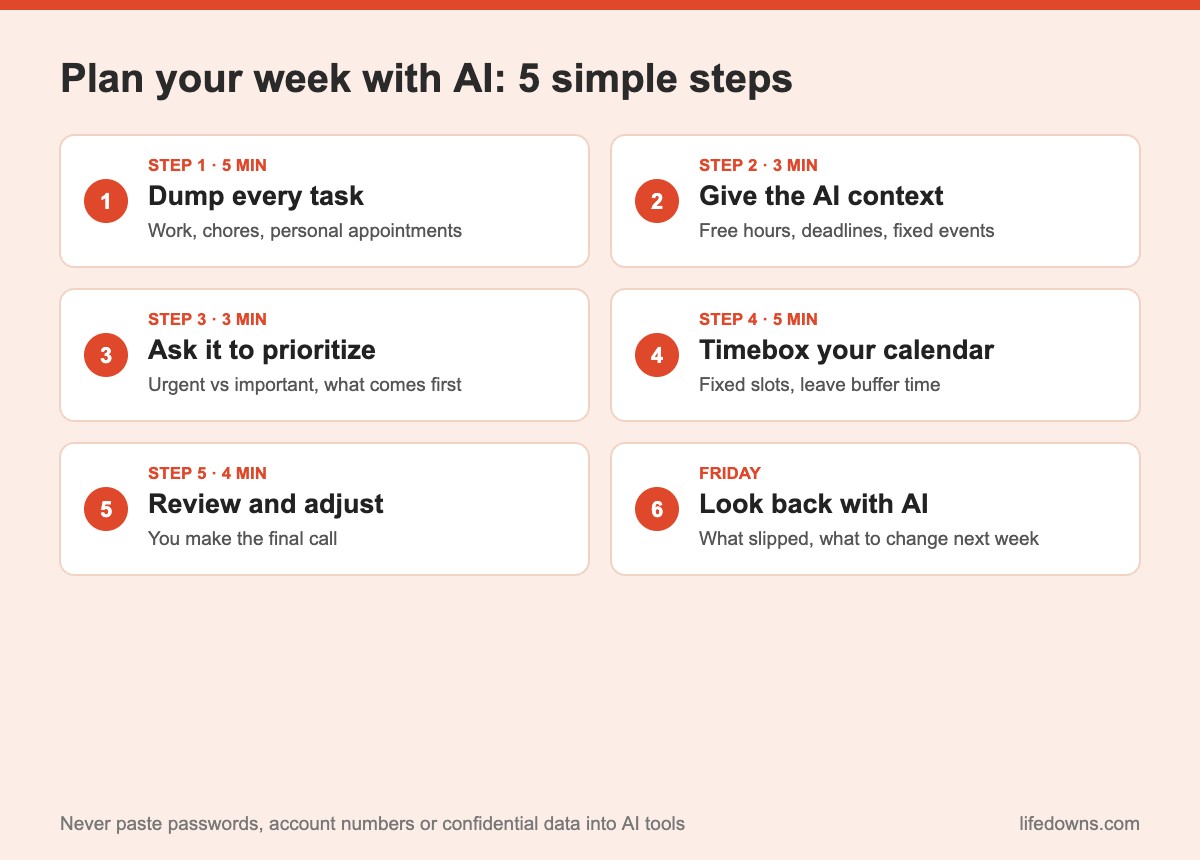
Step 1: Dump every task in 5 minutes
On Sunday evening or Monday morning, open a note and write down everything you can think of: work tasks, chores, personal errands, appointments. No sorting, no neat wording. The goal is to get it all out of your head.
Step 2: Give the AI your context
AI can only schedule well if it knows how much time you have. Tell it your working hours, fixed commitments (meetings, school runs, classes), which tasks have deadlines and when you usually focus best.
💡 Sample prompt: “I work 8:30am–5:30pm Monday to Friday, with team meetings at 9am Monday and 2pm Thursday, and I focus best in the morning. Here are my tasks this week: [paste list]. Please prioritize them, estimate how long each takes and spread them across the days, leaving 20% of my time free for surprises.”
Step 3: Ask it to prioritize
Ask the AI to sort tasks by two criteria: urgent and important. Urgent and important tasks go first; important but not urgent ones get a specific slot; urgent but less important ones can be done quickly or delegated; anything neither urgent nor important is a candidate to drop.
Step 4: Timebox your calendar
A task list only becomes a plan once it has times attached. Ask the AI to use timeboxing: assigning each task a fixed slot in your calendar. Put deep-focus work in your sharpest hours and batch small jobs like email into their own block.
Step 5: Review and adjust it yourself
Read the suggested plan carefully. AI tends to be optimistic about time and does not know constraints you have not mentioned. Fix the durations, move anything that does not make sense, then copy it into your phone calendar or planner.
💡 Quick tip: Ask one more question: “Where is this plan overloaded or unrealistic?” The AI will often point out the weak spots in its own draft.
3. Look back on Friday with AI
On Friday afternoon, spend 10 minutes pasting in what you finished, what you did not and why. Ask the AI to summarize which kinds of tasks you tend to underestimate and which time slots worked best. Those insights make next week’s plan more realistic.
- Which tasks kept getting pushed back? They may need breaking into smaller pieces.
- Which slots kept getting taken over? You may need more buffer time.
- What can you drop? Not every task is worth doing.
4. Things to keep in mind when you plan with AI
- Don’t paste sensitive information: Passwords, account numbers, customer data or confidential company documents do not belong in AI tools.
- Check the time estimates: AI does not know how fast you work, so adjust based on experience.
- Don’t schedule 100% of your time: Always leave room for surprises and rest.
- Reuse your prompt: Save the sample prompt so each week you only paste a new list.
5. The bottom line: plan your week with AI to feel calmer, not to cram in more
Using AI to plan your week will not turn you into a productivity machine, and it should not. The goal is to see clearly what matters, when to do it and how to leave space for life. Twenty minutes with an AI assistant at the start of the week can make the whole week feel lighter.
Summary table: the 5 steps
| Step | What to do | Time | Who leads |
|---|---|---|---|
| 1 | List every task | 5 minutes | You |
| 2 | Share context and free hours | 3 minutes | You |
| 3 | Prioritize urgent vs important | 3 minutes | AI suggests |
| 4 | Timebox into the calendar | 5 minutes | AI suggests |
| 5 | Review, adjust, add to calendar | 4 minutes | You decide |
Note: Times are approximate and depend on how long your task list is.
A few final tips
- Try it for one week: Test it before turning it into a habit.
- Use a tool you know: The AI assistant you already use every day is enough.
- Sync with your phone calendar: A plan only helps if you see it every day.
- Reward yourself: Finish your first planned week and treat yourself to some downtime.
More from our AI section: Writing prompts for AI: four things to include and AI document summaries: what to check.
FAQ: how to plan your week with AI
Do I need a paid tool to plan my week with AI?
No. Popular AI chat assistants, including free versions, can list, prioritize and schedule tasks. Paid versions usually handle longer lists and remember context better.
Should I let AI decide my weekly plan?
No. AI is an assistant that makes suggestions based on what you tell it. Review the time estimates, priorities and anything only you know is important.
What should I tell the AI when planning?
Your task list, deadlines, free hours each day and fixed commitments like meetings or school runs. Avoid pasting passwords, account numbers, customer details or confidential company data.
What if my AI-made weekly plan falls apart midweek?
That is normal. Paste in what is still unfinished and ask the AI to reschedule it across the remaining days, putting the nearest deadlines first.
Have you tried to plan your week with AI yet? Leave a comment and share the prompt that works best for you! Save this post and give it a go next Monday morning. 🤖🗓️