
QR Code Scams: 6 Warning Signs and How to Scan Safely
QR code scams exploit the habit of scanning first and thinking later: a criminal creates a code that leads to a fake website, their own payment account or a malicious install file. Because nobody can read the black-and-white squares by eye, you only find out where the code goes after you scan.
This guide covers 6 warning signs of QR code scams, how to scan safely and what to do straight away if you scanned the wrong one.
Contents: QR code scams
1. How QR code scams work
A QR code is only a way of storing information, usually a link or payment details. The risk lies in where it takes you. According to the US Federal Trade Commission (FTC), scammers cover legitimate codes in public places with their own, or send codes by text or email with an urgent excuse. See the FTC consumer alert on QR codes.
Three common scenarios:
- Fake login pages: copies of bank, e-wallet or social media pages built to capture passwords and one-time codes.
- Swapped payment codes: the money goes to the scammer instead of the shop.
- Malicious downloads: the code leads to an install file outside the official app store.
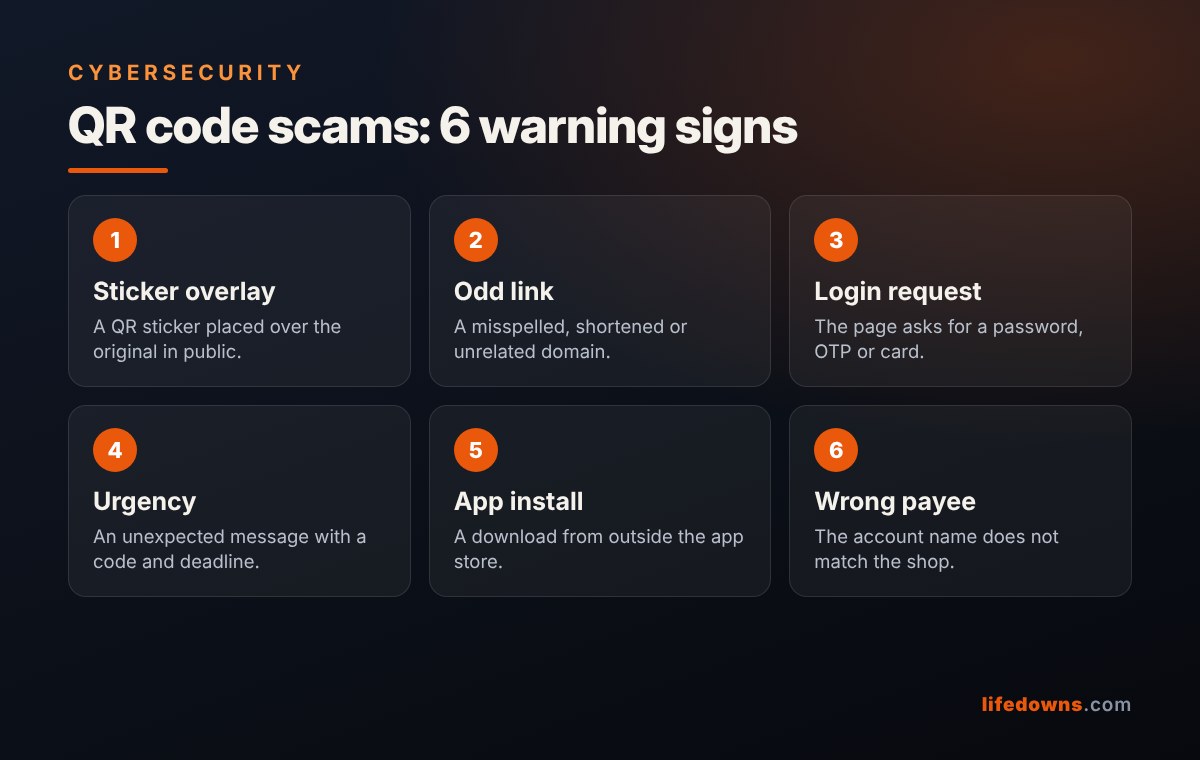
2. 6 warning signs of QR code scams
Sign 1: A sticker over the original
At restaurants, car parks and charging stations, check whether the code is a sticker placed over another one. Raised edges, a crooked frame or different print colour are suspicious.
Sign 2: A strange link
After scanning, the camera usually shows the link before opening it. Read the domain: misspellings, extra characters, link shorteners or a name unrelated to the brand are all bad signs.
Sign 3: A page asking you to log in or enter an OTP
If you scanned to see a menu or claim an offer and the page asks for a banking password, one-time code or card number, stop. Never enter an OTP on a page opened from an unfamiliar QR code.
Sign 4: A message that rushes you
“Your parcel could not be delivered”, “your account will be locked” and “scan to verify within 24 hours” are familiar excuses. If you are worried, open the official app yourself or call the company instead of scanning the code in the message.
Sign 5: A request to install an app from outside the store
A code that leads to a direct download, or asks for accessibility or SMS permissions, is very dangerous. Install apps only from official stores.
Sign 6: The payee name does not match
When you scan a payment code, your banking app shows the account holder’s name. If it does not match the shop or seller, ask before you confirm.
💡 The three-second rule: After scanning, do not tap straight away. Read the link or the payee name first.
3. How to scan QR codes safely
- Use the phone’s built-in camera instead of downloading an unknown scanner app.
- Preview the link and open it only if the domain is right.
- Type the address or open the official app yourself when you need to log in or pay.
- Check the payee name and amount before confirming a transfer.
- Keep your phone updated and turn on two-factor authentication for important accounts.
4. What to do if you scanned a scam QR code
| Situation | What to do |
|---|---|
| Opened the page, entered nothing | Close it and download nothing |
| Entered a password | Change it at once, turn on two-factor authentication, sign out unknown devices |
| Entered card details or an OTP | Call your bank to block the card and transactions |
| Sent money | Report it to your bank and the police immediately, keep screenshots |
| Installed an unknown app | Uninstall it, disconnect from the network, change passwords from another device |
5. Summary: slow down by one beat
QR codes remain convenient and most are safe. To avoid QR code scams, add one habit: look at the code before you scan, and read the link or payee name before you tap.
More from our Cybersecurity section: Password Manager: What It Is and 6 Easy Steps to Get Started in 15 Minutes and Public Wi-Fi Safety: 7 Essential Habits for Cafés, Airports and Hotels.
Frequently asked questions about QR code scams
Can I lose money just by scanning a QR code
Usually not. The risk comes when you open the link and enter a password, OTP or card details, install an unknown app or confirm a transfer.
How do I preview a link before opening it
Most phone cameras show the link on screen once they recognise the code. Read the domain before you tap it.
Should I scan QR codes in emails
Avoid it for emails you were not expecting, especially urgent ones. Go to the official site or app yourself to check.
Are payment QR codes in shops safe
Most are. Just check the code has not been covered by a sticker and that the payee name in your app matches the shop.
Have you ever come across a suspicious QR code? Share it so others can stay alert! 🔐📲