
Phone Battery Charging Done Right: 7 Simple Habits That Keep Your Battery Healthy for Years
Phone battery charging comes with plenty of folklore: drain it fully before charging, never charge overnight, charge a new phone for eight hours. Most of that advice comes from older battery types and simply does not apply to today’s phones.
If your phone’s battery health seems to drop quickly after a year or two, or you just want to charge your phone in a way that makes the battery last, this guide covers 7 simple habits based on how lithium-ion batteries actually work, without asking you to change your routine much.
Contents: phone battery charging
1. Why phone battery charging habits matter
Almost every phone today uses a lithium-ion battery. These batteries age over time and with every charge cycle, and that is unavoidable. What you can control is how fast they age: two identical phones can end up with very different battery health if one is often hot and kept at 100% all the time.
The two biggest stressors are high temperature and keeping the battery very full or very empty for long periods. All 7 habits below come back to these two things.
2. 7 phone battery charging habits that actually help
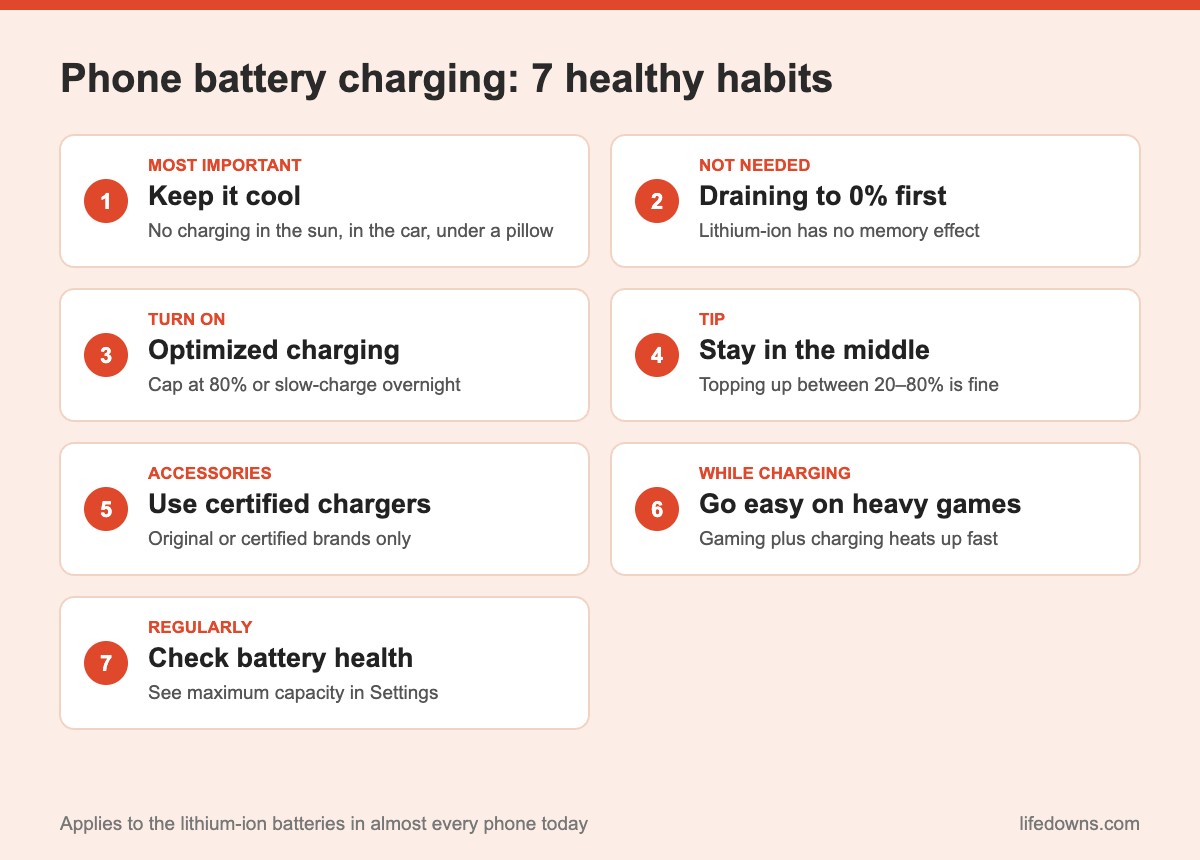
Habit 1: Keep your phone from getting hot
Heat is a battery’s worst enemy. According to Apple’s battery performance guide, using or charging a device in ambient temperatures above 35°C (95°F) can permanently reduce battery capacity. In hot climates, that matters even more.
- Do not charge your phone in direct sun, on a car dashboard or in a hot bag.
- Do not leave it under a pillow or blanket while charging overnight.
- Take off a very thick case if the phone gets noticeably warm while charging.
💡 Quick tip: If your phone feels unusually warm while charging, unplug it, let it cool down and then continue. It is the single most effective habit for protecting the battery.
Habit 2: Don’t drain it to 0% first
The “drain fully, then charge fully” advice comes from old nickel-cadmium batteries that had a memory effect. Lithium-ion batteries do not. Running the battery down to empty regularly actually stresses it more. When it is around 20–30%, it is a good time to plug in.
Habit 3: Turn on optimized charging or a charge limit
This is the easiest way to get phone battery charging right without thinking about it. On an iPhone, go to Settings > Battery > Battery Health & Charging to turn on Optimized Battery Charging; newer models also offer an 80% limit. On Android, look for names like “Adaptive charging”, “Protect battery” or an 80–85% charge limit, depending on the brand.
These features learn your routine, hold the battery around 80% while you sleep and only top it up to full shortly before you usually unplug.
Habit 4: Keep the battery in the middle range
Lithium-ion batteries are happiest between roughly 20% and 80%. You do not need to watch every percentage point, but topping up several times a day does no harm. A 15-minute charge over lunch is better than running the phone flat and charging all the way to 100% in one go.
Habit 5: Use certified chargers and cables
Original chargers or certified accessories from reputable brands (such as MFi-certified cables for iPhone or USB-C Power Delivery chargers) include protection against over-voltage and overheating. Cheap uncertified chargers can deliver unstable power, heat up the phone and pose a safety risk.
Habit 6: Go easy on heavy use while charging
Playing graphics-heavy games, recording 4K video or running navigation while fast charging means the phone is heated by both the battery and the processor. If you have to use it, switch to slower charging or take off the case so it can cool better.
Habit 7: Check your battery health regularly
Every few months, look at the battery health screen. On iPhone it is “Maximum Capacity”; on many Android phones it sits under Device care or Battery. When the number drops to around 80%, or the phone shuts off while it still shows charge, it is a sign the battery needs replacing.
3. Common myths about phone batteries
- “A new phone needs an 8-hour first charge”: Not needed. Charge a new phone normally.
- “Charging overnight will make it explode”: Modern phones stop charging when full. The real risks are poor-quality chargers and heat, not how long it stays plugged in.
- “Closing background apps saves battery”: On modern iPhones and Android phones, constantly swiping apps away rarely helps and can even use more power when you reopen them.
- “Fast charging ruins the battery”: Fast charging does make the phone warmer, but it slows down as the battery fills. What to avoid is long periods of high heat.
💡 Remember: If you only keep one rule in mind, make it “don’t let your phone get hot”. That is half of good phone battery charging.
4. The bottom line: phone battery charging is easier than you think
You do not need complicated charging schedules or “battery booster” apps. Keep the phone cool, turn on optimized charging, use certified chargers and check battery health every few months, and your battery will age noticeably more slowly over the years.
Summary table: do and don’t
| Habit | Do | Don’t | Impact |
|---|---|---|---|
| Temperature | Charge somewhere cool | Charge in the sun or under a pillow | Very high |
| Charge level | Stay around 20–80% | Drain to 0% regularly | High |
| Overnight | Use optimized charging / 80% limit | Sit at 100% for hours | Medium |
| Accessories | Certified chargers and cables | Cheap uncertified chargers | High (and safety) |
| While charging | Light use | Heavy gaming, 4K recording | Medium |
Note: Feature names vary by manufacturer and operating system version.
A few final tips
- Storing a phone long-term: Leave it at about 50% charge, not full or empty.
- Traveling: Carry a certified power bank instead of letting the phone die and rushing to charge it.
- Update your software: Updates often improve battery management and charging.
- Replace the battery properly: Use an authorized service center or a reputable shop with genuine parts.
More from our Technology section: Slow phone? What to clean up before buying a new one and Back up your phone photos with the 3-2-1 rule.
FAQ about phone battery charging
Is it bad to charge my phone overnight?
Modern phones stop charging when full, so overnight charging with a certified charger is not a safety risk. Keeping the battery at 100% for hours does age it faster, though, so turn on optimized charging or an 80% limit.
Should I let my battery drain to 0% before charging?
No. Phone lithium-ion batteries have no memory effect. Draining to empty often is actually harder on the battery than topping up several times a day.
Does fast charging damage the battery?
Fast charging makes the phone warmer, but phones slow down charging as the battery fills. Heat is the real issue, so avoid fast charging while gaming or sitting in the sun.
When should I replace my phone battery?
When maximum capacity drops to around 80%, or the phone shuts down unexpectedly while it still shows charge, it is time to have the battery checked and replaced at an authorized service center.
What is your phone’s maximum battery capacity right now? Leave a comment and share your charging habits! Save this post so you remember to check your battery health every few months. 🔋📱