
Public Wi-Fi Safety: 7 Essential Habits for Cafés, Airports and Hotels
Public Wi-Fi safety matters more than most people think. Free Wi-Fi is everywhere: cafés, airports, hotels and shopping malls. Ask for the password and you can work or browse without using mobile data. But that convenience comes with a catch few people notice: you are sharing a network with many strangers, on equipment you know nothing about.
This guide briefly explains the real risks of public Wi-Fi and 7 essential habits to stay safe, with no technical knowledge needed.
Contents: public Wi-Fi safety
1. Is public Wi-Fi really dangerous?
Today most websites and apps encrypt their connections with HTTPS, so using public Wi-Fi is much safer than it used to be. Still, risks remain in specific situations. According to the U.S. Federal Trade Commission’s advice on public Wi-Fi, the key is paying attention to whether the sites you use are encrypted and steering clear of suspicious networks.
Three common risks
- Fake hotspots: attackers broadcast a network named like the café’s so people connect by mistake.
- Unencrypted websites: data sent over plain HTTP can be seen by others on the network.
- Open sharing: a laptop with file sharing on can be reached by others on the same network.
2. 7 habits for public Wi-Fi safety
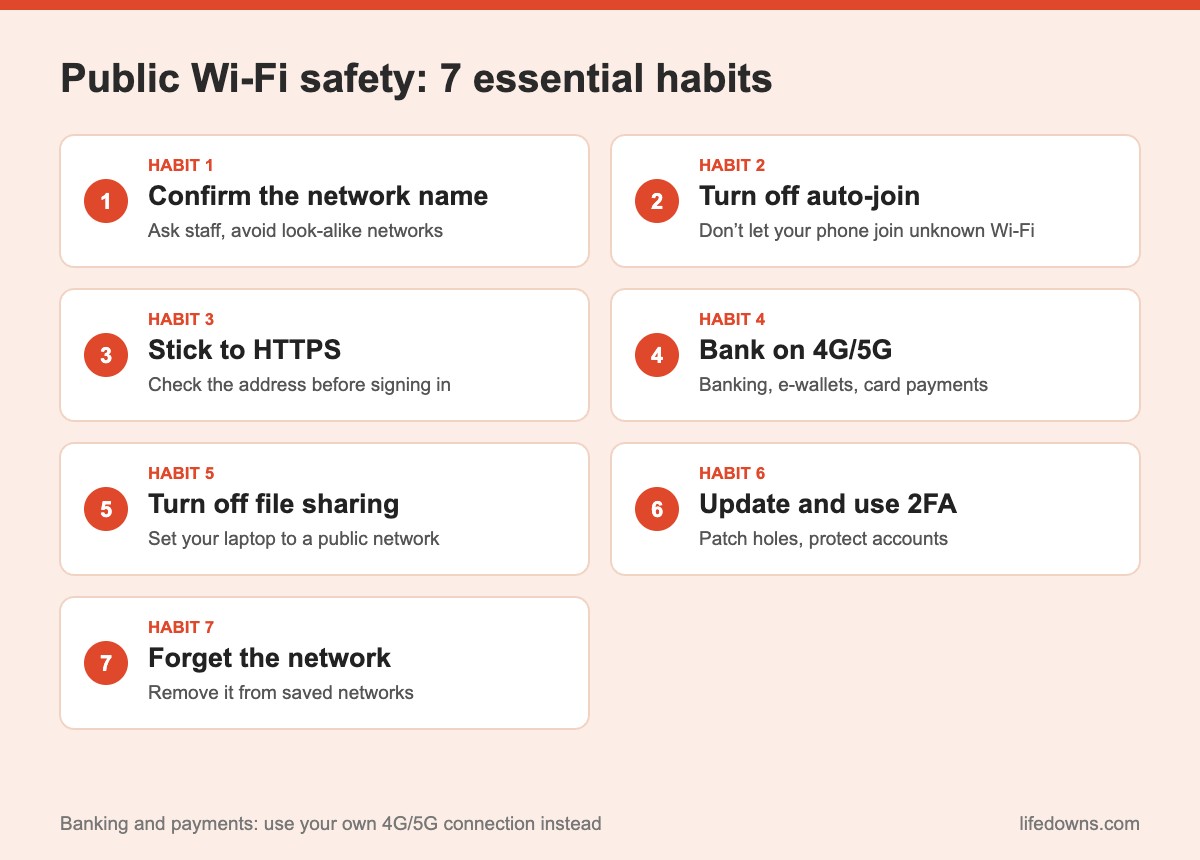
Habit 1: Confirm the network name before connecting
Do not just pick “Free Wi-Fi” or whichever network has the strongest signal. Ask staff for the exact name and password. If you see two identical or near-identical names, be cautious.
Habit 2: Turn off auto-join
Phones automatically reconnect to networks they have used before. Attackers can exploit this by broadcasting a network with a popular name. In your Wi-Fi settings, turn off “Auto-join” or “Connect automatically” for public networks.
💡 Quick tip: Keep auto-join on only for your home and office networks, and set everything else to ask before connecting.
Habit 3: Stick to HTTPS sites
Before signing in or entering details, check the address bar: secure sites start with “https” and show a padlock. Check the spelling of the domain too, to avoid fake pages. If your browser warns about an invalid certificate, stop.
Habit 4: Use 4G/5G for anything financial
For bank transfers, e-wallets or shopping with card details, switch off public Wi-Fi and use your own mobile data. A few minutes on 4G is a simple way to cut the risk significantly.
Habit 5: Turn off file sharing on your laptop
When you join an unfamiliar network, Windows asks what type it is: choose “Public” so other devices cannot discover your computer. On macOS, check Sharing settings and turn off file and screen sharing if you do not need them.
Habit 6: Keep software updated and use two-factor authentication
Operating system and browser updates patch security holes attackers could use. Pair that with two-factor authentication on important accounts, so even if a password leaks, signing in is still hard for someone else.
Habit 7: Forget the network when you leave
When you leave, open your saved networks and tap “Forget this network”. A tidy list stops your device from reconnecting to old networks, including fake ones with the same name.
💡 Remember: A Wi-Fi sign-in page should only ask for the network password or your room number. If it wants your email password, social media login or card details, disconnect immediately.
3. Should you use a VPN on public Wi-Fi?
A VPN creates an encrypted tunnel between your device and the VPN server, making it hard for others on the network to see what you are doing. It is a useful option if you often work from cafés or travel for work. Choose a reputable provider, though; unknown free VPNs may be the ones collecting your data.
4. What is fine, and what should you avoid?
- Fine: reading news, watching videos, listening to music, checking maps.
- Be careful: signing in to email or social media (check HTTPS, have 2FA on).
- Avoid: bank transfers, entering card details, accessing company systems without a VPN.
5. The bottom line: public Wi-Fi safety comes from small habits
You do not have to give up public Wi-Fi, just use it more wisely: confirm the network, turn off auto-join, watch for HTTPS, switch to 4G for payments and forget the network when you leave. These small habits let you enjoy the convenience while keeping your data safe.
Risk by activity
| Activity | On public Wi-Fi | Recommendation | Notes |
|---|---|---|---|
| News, videos | Fine | Go ahead | Don’t enter personal details |
| Social media login | Be careful | Check HTTPS | Turn on 2FA |
| Work email | Be careful | Use your company VPN if available | Don’t open unknown files |
| Bank transfers | Avoid | Switch to 4G/5G | Use only the official app |
| Entering card details | Avoid | Switch to 4G/5G | Check the domain carefully |
Note: Setting names vary by device and operating system version.
A few final tips
- Carry a power bank: So you can always switch to mobile data.
- Lock your screen: Never leave your laptop open when you step away.
- Sign out afterwards: Especially on shared hotel computers.
- Be wary of public USB ports: Use your own charger instead.
More from our Cybersecurity section: Two-factor authentication in 6 steps and One password for everything: why it’s risky.
FAQ about public Wi-Fi safety
Is public Wi-Fi safe to use?
Public Wi-Fi is not automatically dangerous, but you do not control who runs the network or who else is on it. The biggest risks are fake hotspots and unencrypted websites. Used carefully, it is fine for reading news or watching videos.
Should I do online banking on public Wi-Fi?
It is best to avoid it. For banking, e-wallets or entering card details, switch to your own mobile data to reduce the risk.
How can I spot a fake Wi-Fi network?
Fake networks often use a name very similar to the real one, need no password, or appear as duplicates. Ask staff for the exact network name and be suspicious if the sign-in page asks for unusual personal information.
Do I need a VPN on public Wi-Fi?
A VPN from a reputable provider adds encryption and is useful if you often work in public places. Avoid unknown free VPNs, since they may collect your data themselves.
How often do you use public Wi-Fi when you are out? Leave a comment and share your own security habits! Save this post and send it to friends who like working from cafés. 📶🔒